



23 Jun Designing Storage for Performance:A WVMS Perspective
Designing Storage for Performance:A WVMS Perspective
By Wavesys Global
In any video surveillance ecosystem, storage is not just a backend component—it is the backbone that determines how reliably your system performs. Within WVMS (Wavesys Video Management System) environments,storage decisions directly affect recording continuity,system responsiveness, and long-term data integrity.
As organizations move toward higher resolutions,AI-driven analytics, and longer retention requirements, storage planning becomes a strategic necessity rather than a technical afterthought.
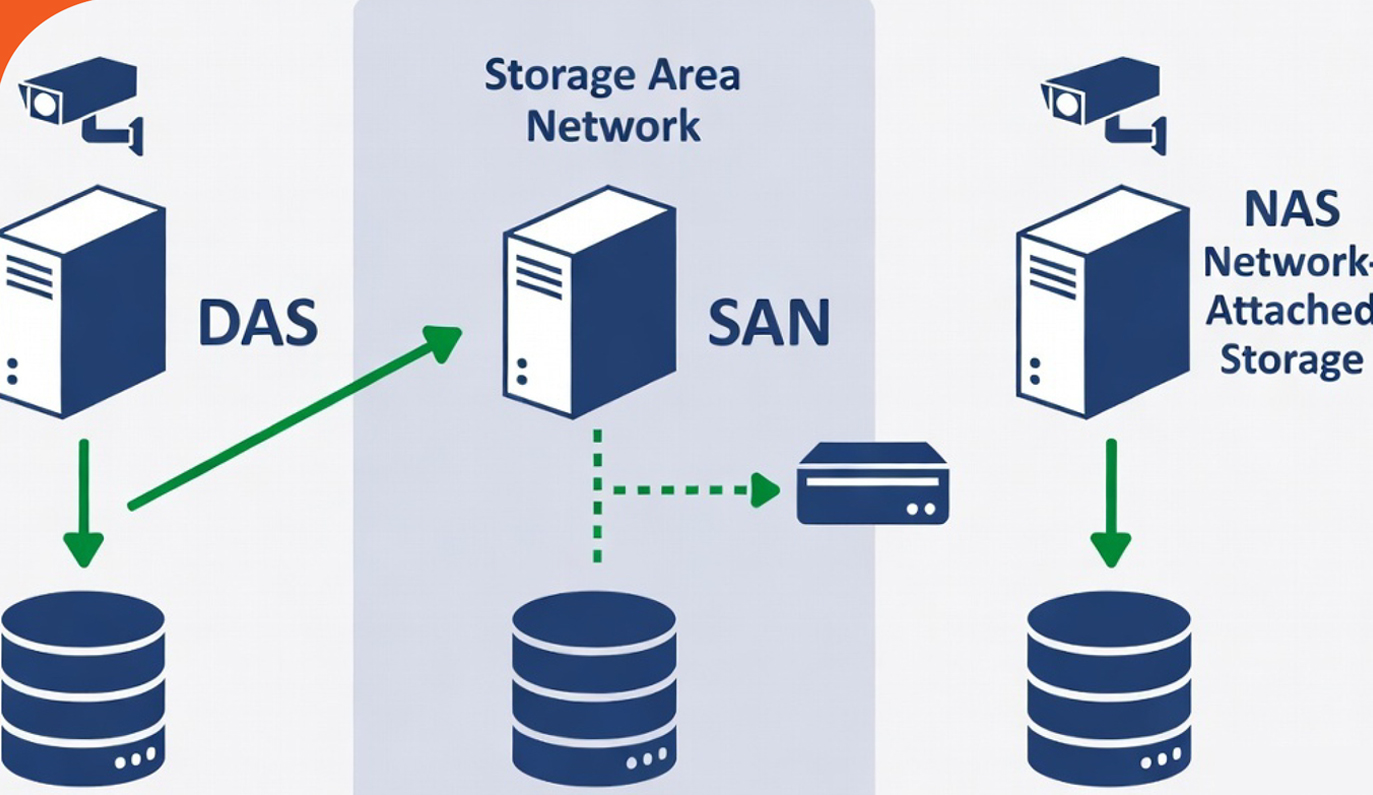
Understanding Your Storage Options
WVMS deployments typically revolve around three storage architectures:
- Direct-Attached Storage (DAS)
- Storage Area Networks (SAN)
- Network-Attached Storage (NAS)
Each model serves a different operational purpose.The right choice depends on how your system scales, how critical uptime is, and how data is accessed across your infrastructure.
DAS: Focused Power for Dedicated Systems
DAS connects storage directly to a recording server, eliminating network dependencies. In WVMS
deployments,this translates into predictable performance and faster data handling.
Why DAS Works Well
- Minimal latency due to direct connection
- Strong performance for continuous video writes
- Lower setup and infrastructure costs
- Straightforward deployment
Where It Falls Short
- Expansion requires additional hardware
- Not suitable for shared or distributed environments
- Server dependency introduces a single point of failure
RAID in DAS: Building Reliability into Performance
To make DAS production-ready for WVMS, RAID configurations are essential.
Where It Falls Short
- Protection against disk failures
- Improved read/write efficiency
- Flexibility across different performance and redundancy needs
- Use RAID 6 with hot spare drives
- Prefer dedicated hardware RAID controllers
- Optimize cache settings to prioritize write operations
JBOD: Simple, but Risk-Prone
JBOD setups treat each disk independently, offering maximum usable capacity but no redundancy.
When It Makes Sense:
- Budget-constrained environments
- Non-critical data storage
SAN: Centralized Strength for Large Deployments
SAN is designed for environments where multiple servers need access to a unified storage pool with minimal latency.between Wavesys and the target system.
Key Advantages
- High availability with built-in redundancy
- Scales efficiently with growing infrastructure
- Supports mission-critical operations
Trade-Offs: Higher costs, specialized configuration, dependency on robust network design.
Ideal For: Enterprise WVMS installations where downtime is not an option.
NAS: Practical and Scalable for Mid-Sized Systems
- Easy to deploy and manage
- Cost-effective for moderate workloads
- Enables shared and remote access
Limitations: Performance tied to network conditions, struggles under heavy write loads, not ideal for high-density recording.
Best Fit: Small to medium WVMS setups, backup storage, or secondary archives.
Why Storage Planning Matters
- Missing video frames
- Incomplete recordings
- Gaps in critical footage
Bottom line: storage must be designed around real workload behavior, not just theoretical specs.
Requirement Estimation
Throughput Example
20 cameras at 8 Mbps → ~20 MB/s sustained write performance
Capacity Example
30 cameras, 30-day retention, 6 Mbps bitrate → ~57 TB storage capacity
Note: Redundancy (RAID) should always be factored into final sizing.
Practical Guidelines for WVMS Storage Design
- Design for peak load, not average usage
- Always incorporate redundancy mechanisms
- Choose systems that can scale with your surveillance footprint
- Validate performance with real-world testing before deployment
At-a-Glance Comparison
| Criteria | DAS | SAN | NAS |
|---|---|---|---|
| Performance | Very High | Very High | Moderate |
| Cost | Low | High | Moderate |
| Scalability | Limited | Extensive | Moderate |
| Complexity | Low | High | Low |
| Best Use Case | Dedicated recording | Enterprise infrastructure | Mid-sized deployments |
Closing Thoughts
A well-architected storage strategy is fundamental to getting the best out of WVMS.The right choice isn’t about picking the most advanced technology—it’s about aligning infrastructure with operational needs.
When storage is planned correctly,WVMS delivers what it is designed for: consistent performance,reliable
recording, and complete data confidence.on requirements,storage planning becomes a strategic necessity rather than a technical afterthought.
Sorry, the comment form is closed at this time.